Version 1.0 issued November 2025
Welcome to Phase 1 - Receipt of Waste API
Introduction
This page introduces waste receivers, software developers and third party software providers to the Defra Waste Tracking Service (DWT) Receipt API. Learn here about how receivers and developers can get started with the digital processes involved in reporting details of each waste movement arriving at their site. This will be mandatory from October 2026.
Note: During this document's life-time some of the existing features of the API might be enhanced. You should periodically review the Defra Waste Tracking Service (DWT) Receipt API Changelog.
Receipt API Overview
The latest version of the Receipt of Waste API OAS Specification is available here.
Receipt of Waste Process Flow
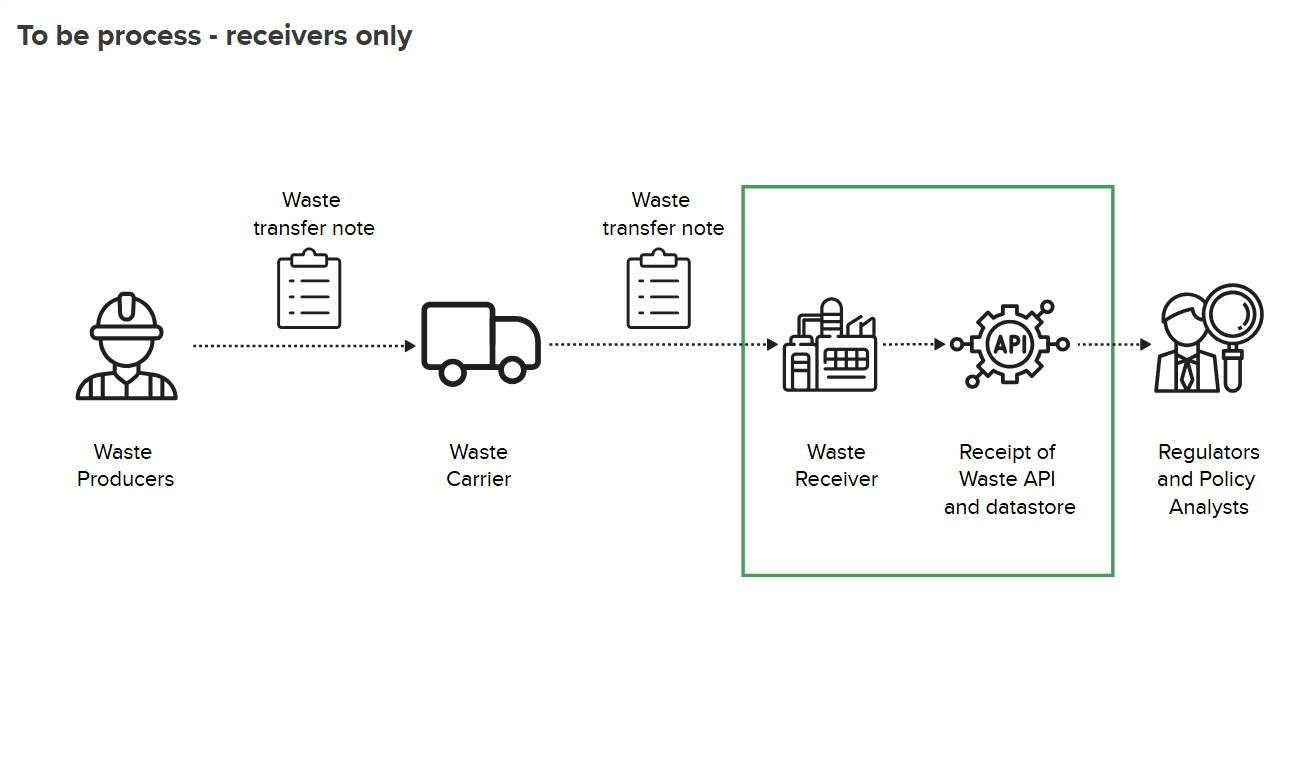
The API is based on REST principles and currently has seven endpoints. They return data in JSON format and use standard HTTP error response codes, see the table below.
| Endpoint | Description |
|---|---|
| POST | is used to create a record for a waste movement that has arrived at a waste receiving site. It returns a waste tracking ID and a validation result. |
| PUT | is used to update a waste tracking record using a waste tracking ID query parameter to identify the movement. It returns a validation result. |
| GET | is used to retrieve a list of European Waste Codes (EWC). |
| GET | is used to retrieve a list of hazardous waste codes (called Special Waste Codes in Scotland). |
| GET | is used to retrieve a list of Disposal or Recovery codes. |
| GET | is used to retrieve a list of Container Types. |
| GET | is used to retrieve a list of Waste POP Codes. |
Note: At present the API endpoints relate only to Great Britain and Northern Ireland.
API Status
This version of the Receipt of Waste API:
- supports only the API v1.0 Receipt of Waste API for Private Beta customers.
- a roadmap to the Receipt API can be found here.
Related API Documentation
Receipt of Waste - API v1.0 Reference Guide
Receipt of Waste - API Production Approval Tests
Defra Receipt of Waste Policy Website
Receipt of Waste API Data Definitions
Getting Started
Work through these short sections on practical preparation and use of the API:
- Getting started
- Authentication
- Making API Requests
- Validating a Collection of Requests and Responses
- Getting help from the API support team
Prequisite Steps (Developers)
To develop using the Receipt of Waste API, you must:
- Be familiar with HTTP, RESTful services and JSON and OAuth.
- Have received your client id and secret. These will be sent to the developer after signing up for Private Beta.
- Be familiar with the API's terms of service.
These are the necessary steps:
-
Developers need to sign-up for Private Beta using the on-boarding form. They will then be issued a client id and secret.
-
Gain access to the test environment. The URL is shown below:
http://waste-tracking.integration.api.defra.gov.uk/ -
Using the credentials for the test environment (the client ID and Client Secret) request an OAuth bearer token. See Authentication.
-
To begin testing, you also need a Dummy API Code. See API Codes for Testing and Production.
-
Begin sending requests and developing the integration with the API. At the same time you will be demonstrating that you have implemented the specification in its entirety. Ensure that all scenarios have been implemented. Some useful test scripts can be found here.
When you’ve completed developing and testing your integration, please email a test submission for each of these scenarios and note down the corresponding Waste Tracking ID’s so we can review. See the support email links listed below.
-
Following approval of the test submission and acknowledgement of the Terms of Service, you will receive a client ID and secret for the production environment.
You can now begin sending waste movements to the Waste Tracking Service.
Prequisite Steps (Receivers)
- Waste Receivers need to sign-up for private beta using the on-boarding form.
- Accept the API Terms and Conditions.
- Get the Production API Code. After successfully completing the on-boarding programme, an API Code will be issued to the Receivers and from them, to their Software Vendors who store them and then set up the connection to the Waste Tracking Service. This code uniquely identifies your organization within the Digital Waste Tracking service.
Authentication
To start using the Receipt API, you need first to authenticate your access using your Client ID and Secret which you should have received via email. You will need this to apply to the OAuth service for an access token and make your first receipt of waste movement request.
For a more detailed description with code snippets, refer to this authentication information.
Making API requests
Before sending any requests to the Receipt of Waste API, make sure that you are addressing the following points in your software:
The base URLs of the test and production environments are as follows:
Test: http://waste-tracking.integration.api.defra.gov.uk/

Production: http://waste-tracking.api.defra.gov.uk/
What Makes up a Receive Waste Movement Request?
A request starts with a command and a URL specifying the method and the API endpoint or server you want to interact with, in this case the Waste Tracking Service. An example is shown below.
curl --request POST \
  --url http://waste-tracking.api.defra.gov.uk/
  --header 'authorization: Bearer eyJraWQiOiJQYnJiZXZ \
  --header 'content-type: application/json' \
  --data '{
  "apiCode": "b74cbf3c-e9e2-43f3-bd6b-009d37a8d677",
  "dateTimeReceived": "2025-10-15T11:05:05.310Z",
  "reasonForNoConsignmentCode": "Carrier did not provide documentation"
This is broken down as follows:
- The cURL command and URL
curl --request POST \
  --url http://waste-tracking.api.defra.gov.uk/
- The header information containing the Bearer Token and the content type
 --header 'authorization: Bearer
 eyJraWQiOiJQYnJiZXZv
 --header 'content-type: application/json' \
- The Request Body
-- data '{
  "apiCode": "b74cbf3c-e9e2-43f3-bd6b-009d37a8d677",
  "dateTimeReceived": "2025-10-15T11:05:05.310Z",
  "reasonForNoConsignmentCode": "Carrier did not provide documentation", ...etc
  }
The Request Body is the essential part of an API POST or PUT request, it contains important data fields that a waste receiver needs to report about a waste movement.
An example of a complete cURL Receive Waste API Request Body used by the POST and PUT methods is as follows:
{
  "apiCode": "1f83215e-4b90-4785-9ab2-2614839aa2e9",
  "dateTimeReceived": "2025-11-20T12:26:24.281Z",
  "reasonForNoConsignmentCode": "NO_DOC_WITH_WASTE",
  "wasteItems": [
    {
      "ewcCodes": [
        "200121"
      ],
      "wasteDescription": "Industrial waste containing persistent organic pollutants (POPs) and hazardous heavy metals from decommissioned electrical equipment and contaminated soil",
      "physicalForm": "Mixed",
      "numberOfContainers": 15,
      "typeOfContainers": "SKI",
      "weight": {
        "metric": "Tonnes",
        "amount": 1.2,
        "isEstimate": true
      },
      "containsPops": true,
      "pops": {
        "sourceOfComponents": "CARRIER_PROVIDED",
        "components": [
          {
            "code": "CHL",
            "concentration": 250
          },
          {
            "code": "TOX",
            "concentration": 156.4
          },
          {
            "code": "DCF",
            "concentration": 0.8
          },
          {
            "code": "DDT",
            "concentration": 1.2
          }
        ]
      },
      "containsHazardous": true,
      "hazardous": {
        "hazCodes": [
          "HP_1",
          "HP_3",
          "HP_6"
        ],
        "sourceOfComponents": "CARRIER_PROVIDED",
        "components": [
          {
            "name": "Mercury",
            "concentration": 0.35
          },
          {
            "name": "Arsenic",
            "concentration": 300
          },
          {
            "name": "Chromium",
            "concentration": 0.42
          },
          {
            "name": "Lead",
            "concentration": 0.89
          }
        ]
      },
      "disposalOrRecoveryCodes": [
        {
          "code": "R1",
          "weight": {
            "metric": "Tonnes",
            "amount": 0.75,
            "isEstimate": false
          }
        }
      ]
    },
    {
      "ewcCodes": [
        "150110"
      ],
      "wasteDescription": "Secondary waste containing plastic packaging and minor contaminants",
      "physicalForm": "Solid",
      "numberOfContainers": 5,
      "typeOfContainers": "SKI",
      "weight": {
        "metric": "Tonnes",
        "amount": 1.1,
        "isEstimate": true
      },
      "containsPops": false,
      "pops": {
        "sourceOfComponents": "NOT_PROVIDED"
      },
      "containsHazardous": true,
      "hazardous": {
        "hazCodes": [
          "HP_6"
        ],
        "sourceOfComponents": "CARRIER_PROVIDED",
        "components": [
          {
            "name": "Arsenic",
            "concentration": 75
          }
        ]
      },
      "disposalOrRecoveryCodes": [
        {
          "code": "R1",
          "weight": {
            "metric": "Tonnes",
            "amount": 0.75,
            "isEstimate": false
          }
        }
      ]
    }
  ],
  "carrier": {
    "organisationName": "Carrier Ltd",
    "registrationNumber": "CBDL999999",
    "address": {
      "fullAddress": "321 Test Street, Test City",
      "postcode": "TC2 2CD"
    },
    "emailAddress": "test@carrier.com",
    "phoneNumber": "01234567890",
    "meansOfTransport": "Road",
    "vehicleRegistration": "AB12 CDE"
  },
  "receiver": {
    "siteName": "Receiver Ltd",
    "emailAddress": "receiver@test.com",
    "phoneNumber": "01234567890",
    "authorisationNumber": "PPC/A/9999999"
             }
  },
    "regulatoryPositionStatements": [
      123,
      456
    ]
  {,
  "receipt": {
    "address": {
      "fullAddress": "123 Test Street, Test City",
      "postcode": "TC1 2AB"
    }
  }
}
Validating a Collection of Requests and Responses
We have assembled a collection of Bruno test scripts to help you learn about working with the Receipt API. These scripts can be found here.
Error Responses
A detailed description of the error responses for this API can be found in the Receipt API v1.0 Reference Guide.
Service Rate Limits
200 hits per second soft limit.
This means that if a user bursts over 200 hits per second for a short time - this is acceptable. If they stay above the limit for a significant time they will start receiving Rate Limit Exceeded 429 status codes. User's software should handle the response using best development practices like exponential back-offs and retries.
Getting help by email
-
For developers: WasteTracking_Developers@defra.gov.uk
-
For receivers: WasteTracking_Testing@defra.gov.uk
-
All users can also post questions/comments here in our discussions forum
Changelog
You can find the changelog for this document in the Receipt API v1.0 Landing Page GitHub wiki.